 For Everyone
What Is Progressive Web App
by AIR.POG Team
A progressive web app is a website that works like a native app, installable, offline-capable, and fast, without requiring app store distribution. The term emerged in 2015, and PWA usage roughly doubled between 2022 and 2025, reaching 12.5 million desktop uses and 15.5 million mobile uses according to the 2025 Web Almanac.
You're probably carrying several apps you rarely use, opening websites that forget who you are, and switching between maps, search results, coupon pages, and merchant sites whenever you need something nearby. A PWA aims to remove that friction. It keeps the reach and discoverability of the web, then adds the useful parts of an app experience, such as a home-screen icon, full-screen launch, caching, and selected offline behavior.
Table of Contents
- The Problem With Traditional Apps and Websites
- Core Technologies Behind Progressive Web Apps
- Key Benefits That Make PWAs Stand Out
- How PWAs Work in Practice With AIR.POG
- Comparing PWAs Against Native Apps and Websites
- Best Practices for Building Successful PWAs
<a id="the-problem-with-traditional-apps-and-websites"></a>
The Problem With Traditional Apps and Websites
You're driving through an unfamiliar area and want to find a useful deal nearby. One merchant advertises on its own website, another appears in a coupon directory, and a third promotion is buried in a social feed. You open several tabs, dismiss an app-install prompt, wait for a slow page, and try to work out which offer is near your route.
Traditional apps and websites create different kinds of friction. Native apps can provide polished, device-specific experiences, but users must usually find, install, update, and keep another application on their phone. A website removes much of that installation barrier, yet it may feel disconnected from the device, especially when it loads slowly or loses functionality during a weak connection.

<a id="the-gap-between-reach-and-convenience"></a>
The gap between reach and convenience
The problem isn't only technical. It's also cognitive. Every extra search result, login screen, permission request, and navigation step asks users to make another decision. That burden matters even more for commuters, travelers, and anyone trying to make a quick stop.
PWAs were created to bridge this gap. The formal concept was coined by designer Frances Berriman and Google Chrome engineer Alex Russell in 2015, although Chrome 40 had already implemented major parts of the model in December 2014. By 2016, developers were presenting PWAs as an alternative to native apps because a web-based experience could work across platforms without separate app-store packaging. The Web Almanac's PWA history documents that development.
A PWA still begins as a website. Users can discover it through a browser and search engine, but they may also install it to the home screen. Once configured correctly, it can launch in an app-like display mode, reuse cached resources, and continue supporting selected functions when the network becomes unreliable.
Practical rule: A PWA shouldn't imitate every native feature. It should remove the specific points of friction that prevent people from completing a task.
<a id="core-technologies-behind-progressive-web-apps"></a>
Core Technologies Behind Progressive Web Apps
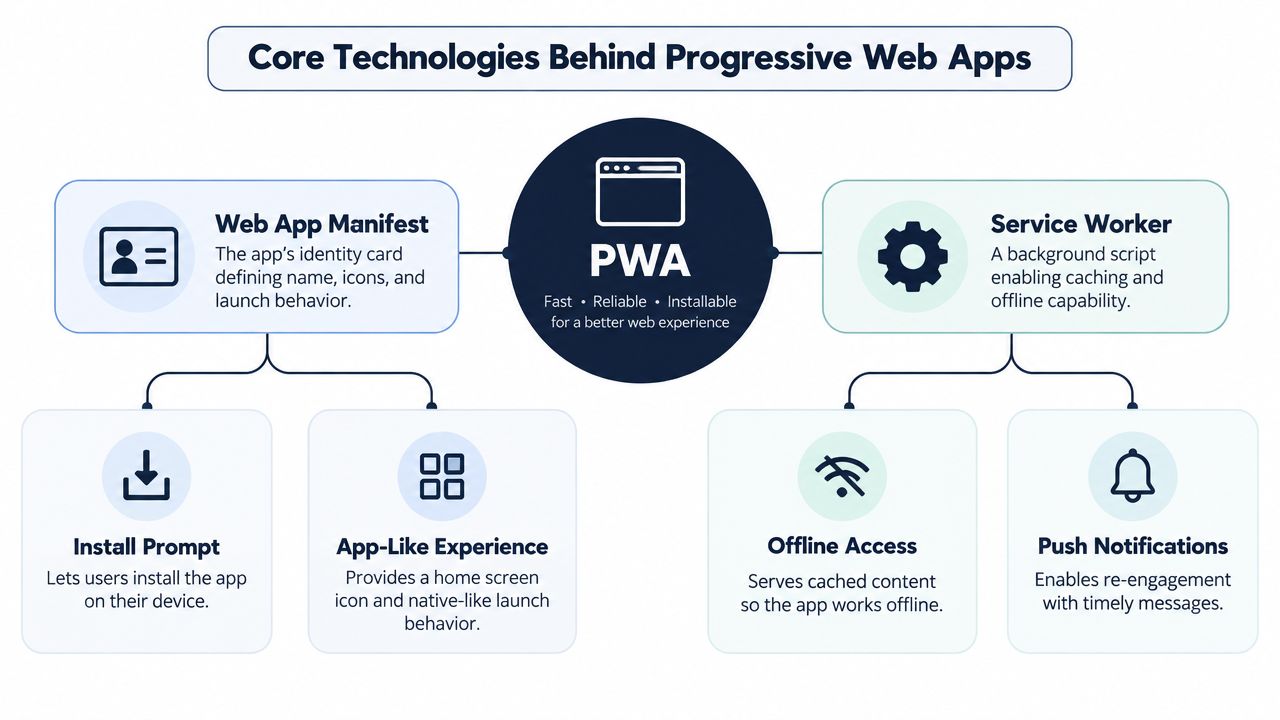
A PWA rests on two core technical primitives, the web app manifest and the service worker. Think of the manifest as the app's identity card and the service worker as its local operations assistant. One tells the browser what the app is and how it should appear. The other manages selected work around network requests and background activity.
<a id="the-manifest-defines-the-apps-identity"></a>
The manifest defines the app's identity
The web app manifest is a JSON file containing presentation and installation metadata. It can specify:
- Name and short name: The label users see in installation surfaces and on the device.
- Icons: The visual identity used for shortcuts and launchers.
- Start URL: The page opened when someone launches the installed app.
- Display behavior: Whether the app opens in a browser tab or a more app-like window.
- Launch settings: Details such as orientation and related presentation preferences.
Chromium-based browsers generally look for at least a name or short_name, 192px and 512px icons, a start_url, and a display or display_override value when evaluating installability. The app must also use HTTPS, except during local development on localhost or 127.0.0.1, as explained in MDN's installability guide.
For users, this is what makes “add to home screen” feel intentional rather than like an ordinary bookmark. A practical example is how to add a web app to your home screen, where the saved shortcut becomes a direct entry point.
<a id="the-service-worker-handles-network-uncertainty"></a>
The service worker handles network uncertainty
A service worker is a background script that runs separately from the page. It can intercept network requests, place selected files in a local cache, and return those files when the network is slow or unavailable.
Suppose an app has already stored its basic interface, styles, scripts, and selected images. During a later visit, the service worker can retrieve those resources from the cache instead of waiting for every request to reach the server. It can also support background events such as push notifications and data synchronization, independent of the page lifecycle. MDN's PWA documentation describes these two primitives and their roles.
The service worker doesn't magically make every feature work offline. New data still needs a network unless the application has deliberately cached or stored it. Developers must decide what to save, when to refresh it, and what message users should see when live data isn't available.
<a id="key-benefits-that-make-pwas-stand-out"></a>
Key Benefits That Make PWAs Stand Out
A driver searching for a nearby deal may move between search results, merchant pages, maps, and app prompts before deciding where to go. A PWA can bring that journey into one installable web experience, combining the reach of a website with the quick entry point of an app. For AIR.POG, that means reducing fragmented deal discovery and the mental effort required while driving.
<a id="installability-without-the-usual-barrier"></a>
Installability without the usual barrier
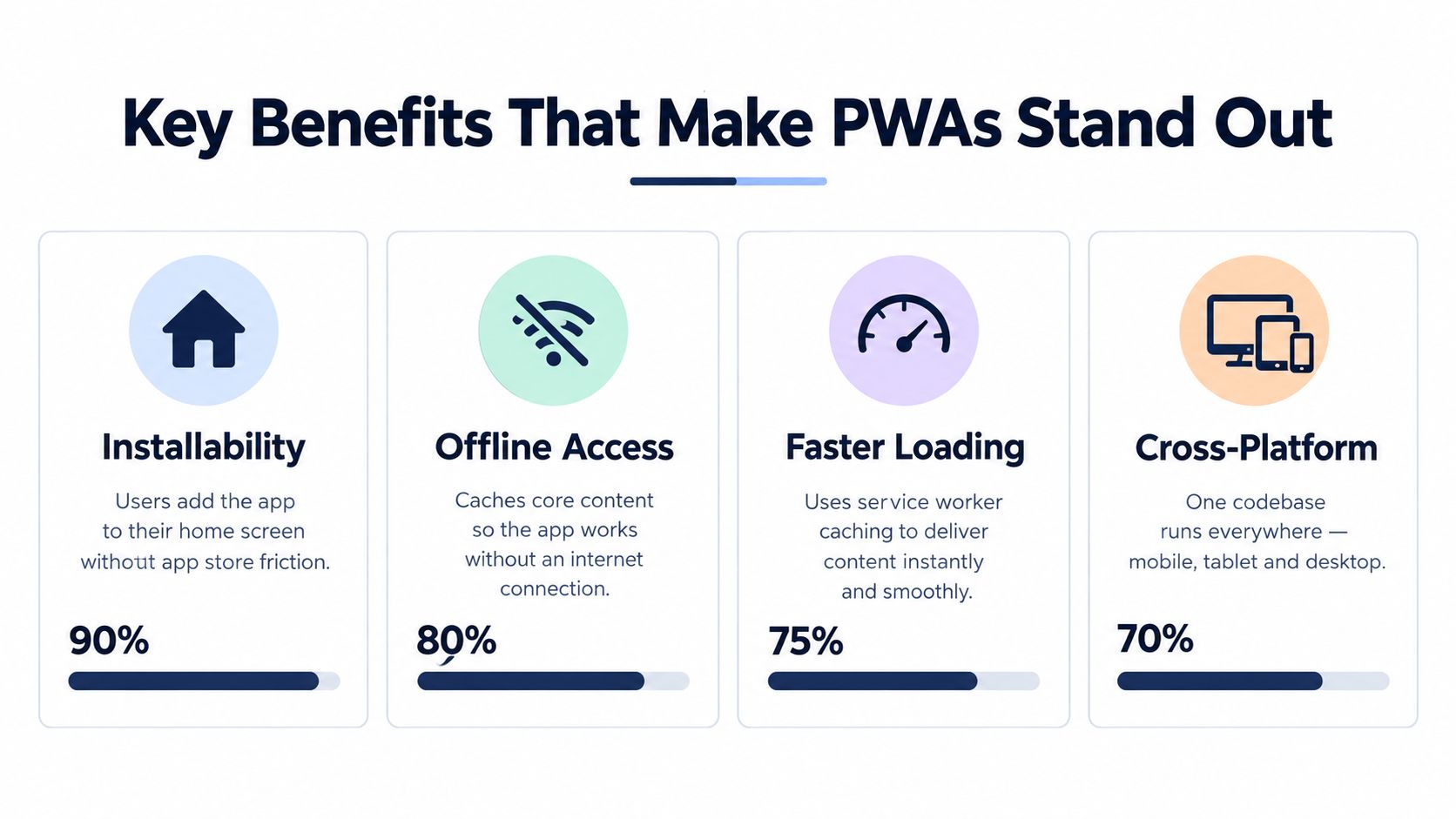
A user can open a PWA from a web link, use it immediately, and install it later if it proves useful. The shortcut can sit on the home screen without requiring a separate native package for every operating system or an app-store search before the first visit.
That approach also gives product teams room to develop in stages. They can begin with a web experience, then add an app-style interface, caching, and installation support as the service grows. The same underlying product remains available to people who prefer a normal browser tab.
<a id="reach-across-devices"></a>
Reach across devices
PWA installation can work across Windows, ChromeOS, macOS, Linux, and Android, with browser support that includes Chrome, Edge, Samsung Internet, Brave, and Firefox. Chrome's PWA introduction describes this model as a cross-platform delivery layer rather than a device-specific binary.
Cross-platform does not mean identical. Browsers and operating systems can differ in permissions, storage, notifications, background behavior, and installation prompts. Teams should test the workflows their users depend on, including the path from discovering an offer to opening directions in AIR.POG.
<a id="cached-loading-and-partial-offline-use"></a>
Cached loading and partial offline use
A service worker can serve the app shell and other selected resources from the Cache API, helping repeat visits begin without waiting for every file to arrive from the network. With deliberate offline planning, a PWA can also remain useful during intermittent connectivity.
The benefit reaches beyond perceived speed. Cached screens can preserve a user's place, reduce waiting, and support a limited task when the connection briefly disappears. Live deal information still needs an appropriate data strategy, so caching cannot substitute for decisions about freshness, storage, and fallback messages.
<a id="adoption-is-meaningful-not-universal"></a>
Adoption is meaningful, not universal
PWA technologies are established, but complete adoption remains uneven. As the 2025 Web Almanac analysis cited earlier shows, sites often use individual building blocks without delivering a complete installable experience.
That distinction matters for planning. A team may add caching but postpone manifests, installation flows, analytics, permissions, or cross-platform testing. PWAs therefore provide a practical way to extend a web product, while the right balance between web and native delivery still depends on the product's users, tasks, and technical requirements.
<a id="how-pwas-work-in-practice-with-airpog"></a>
How PWAs Work in Practice With AIR.POG
A location-based deal search exposes the weaknesses of fragmented browsing quickly. A driver may need to find a nearby promotion, judge whether it's relevant, and get directions without scrolling through generic listings or opening several merchant pages.
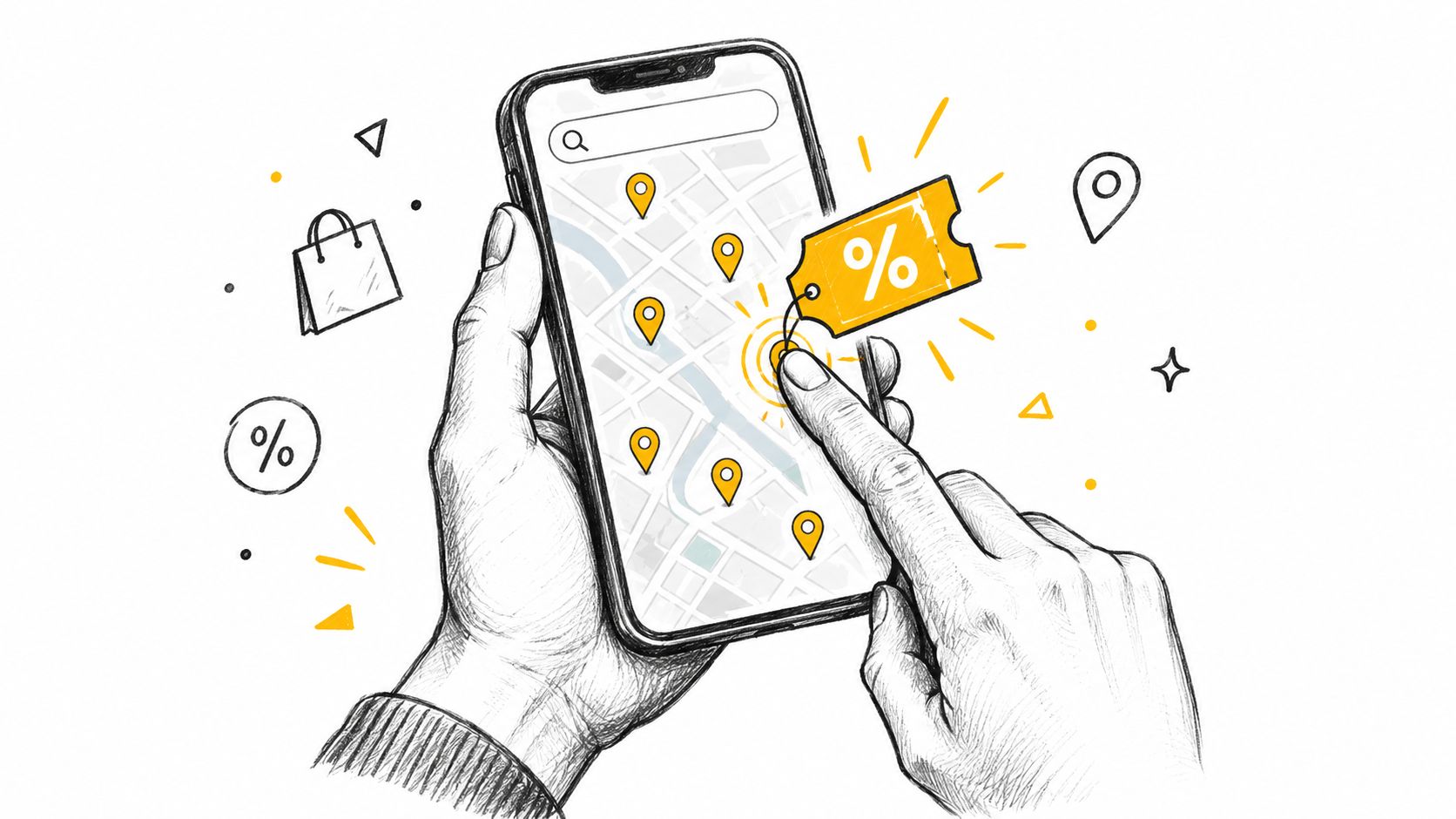
AIR.POG provides a concrete example of that PWA pattern. Its location-aware interface presents nearby promotions on an interactive map, centered on the user's current location or a selected city. A user can adjust the scanning radius, select a venue, and move from discovery to routing with a small number of taps.
<a id="turning-discovery-into-a-short-decision"></a>
Turning discovery into a short decision
The map-first design addresses a specific driver problem: relevance depends on proximity and direction, not just on the existence of a discount. A large list of offers can force users to compare distance, location, and timing mentally. A map gives that context visually, while the tap-to-route flow connects the selected deal to the next action.
POG REELS adds a short-form view of live local sales and time-sensitive offers. POG'ODEX provides a browsable index for people who prefer organized entries beyond the map. These views serve different discovery habits without requiring the user to search across disconnected sources.
The installed experience can launch in a full-screen, app-like presentation. That matters for quick, repeated use because the user can open the saved entry point instead of starting with a browser search each time. The service-worker layer can also cache selected resources, although live promotions and current map information still depend on network access.
AIR.POG illustrates progressive enhancement rather than a promise that every feature works everywhere. The web version remains the starting point, installation adds convenience, and caching can support resilience where the product has prepared for it.
<iframe width="100%" style="aspect-ratio: 16 / 9;" src="https://www.youtube.com/embed/RxuYmHhR9mQ" frameborder="0" allow="autoplay; encrypted-media" allowfullscreen></iframe>The broader lesson is transferable. A PWA earns its place when installability, quick launch, cross-platform access, and selective offline behavior solve a real user problem. For a location-first service, those qualities reduce the distance between “what's nearby?” and “take me there.”
<a id="comparing-pwas-against-native-apps-and-websites"></a>
Comparing PWAs Against Native Apps and Websites
The right delivery model depends on the job. A traditional website maximizes reach and linkability, a native app can access tightly integrated platform capabilities, and a PWA combines web distribution with selected app-like behaviors.
| Criterion | Traditional website | Native app | PWA | |---|---|---|---| | Access | Opened through a browser link | Downloaded through a platform channel | Opened through the web and optionally installed | | Updates | Usually delivered on the server | Managed through app releases and platform processes | Delivered through the web, with caching rules to manage | | Offline behavior | Usually limited unless deliberately engineered | Often available for designed features | Available for selected cached resources and workflows | | Platform reach | Broad browser reach | Platform-specific binaries | Cross-platform web delivery with browser differences | | Discoverability | Strong through links and search | Often depends on store discovery or direct acquisition | Combines web discovery with an installable entry point | | Device integration | Depends on browser capabilities | Generally deepest integration | Selective integration through web APIs and permissions |
A native app remains sensible when a product depends on intensive device integration, platform-specific interaction, or capabilities the target browsers don't expose consistently. A website may be enough when users need occasional access and don't benefit from installation or offline continuity.
A PWA makes sense when the product needs repeat access, a lightweight launch path, and one web-based experience across devices. It doesn't eliminate platform variance, and it doesn't remove the need for testing. The PWA versus native app comparison can help product teams examine those tradeoffs in more detail.
<a id="best-practices-for-building-successful-pwas"></a>
Best Practices for Building Successful PWAs
A manifest and service worker don't automatically create a useful PWA. The product still needs a clear task, reliable interaction design, sensible caching, and honest handling of network limits.
<a id="start-with-the-users-essential-action"></a>
Start with the user's essential action
Define what someone must be able to do when the connection is poor. For a reading product, that may be opening saved articles. For a field tool, it may be viewing previously loaded records. For a local discovery service, it may be opening the interface and reviewing information already available, while clearly marking live data that requires a connection.
Cache the smallest useful application shell first. Store pages, styles, scripts, and images deliberately, then decide how the service worker should update them. MDN's guide to offline and background operation explains how a service worker can fetch resources and save them locally for later use.
<a id="treat-installation-as-a-user-decision"></a>
Treat installation as a user decision
Don't interrupt a visitor with an install request before they understand the product. Show the prompt or installation guidance after a meaningful interaction, and explain what the installed version changes. A home-screen icon should represent a genuine shortcut to repeated value, not a substitute for fixing a confusing website.
The manifest needs accurate names, icons, a start URL, and display settings. Confirm that the HTTPS requirement is satisfied outside local development, then test installation from the browsers and devices your audience uses. The practical guide to building an installable web app provides a focused starting point.
<a id="test-the-failure-states"></a>
Test the failure states
A good PWA behaves predictably when requests fail. Test first launch, repeat visits, expired cached data, interrupted downloads, denied permissions, changed locations, and restored connectivity. Provide clear status messages instead of showing information that may no longer be current without explanation.
Cross-platform access also requires restraint. A feature that works in one browser may have different permission or background behavior elsewhere, so progressive enhancement should keep the core experience usable before adding optional capabilities.
Build for continuity, not imitation. The strongest PWA isn't the one that copies every native screen. It's the one that helps users finish an important task with fewer interruptions.
AIR.POG offers a location-aware way to find nearby promotions on an interactive map, review live local offers, and route to selected venues through an installable web app. Visit AIR.POG to explore how a PWA can turn fragmented deal discovery into a quicker, more focused mobile experience.
Spread the word — every share brings more POG'rs to the map. 🎯
Got a story or tip?
