 For Everyone
Phone Ball Mount Guide for Safer Driving and Navigation
by AIR.POG Team
You're halfway through a commute when the navigation screen slips downward, the map starts vibrating, and the next turn disappears behind glare. You reach for the phone, tighten the knob at the next light, and discover that the problem isn't the cradle. The ball joint has crept under load, or the base has started separating from the surface.
A good phone ball mount should make that scenario rare. It should hold a heavy phone through potholes, stay adjustable without becoming sloppy, and position the screen where you can understand the route without repeatedly looking away from traffic. It also needs to work with the phone you carry, including a large device, a thick case, or a wireless charging setup.
That last point matters because mounts reduce some, but not all, driving distraction risk. A peer-reviewed study found that mounted phones can have less distraction potential than handheld phones, while also concluding that the mounting position can make the phone as distracting as other in-car tasks. The study on mounted mobile phone distraction is a useful reminder that stability, placement, and interaction design belong in the same conversation.
Table of Contents
- Why Your Phone Mount Keeps Failing You
- How the Ball and Socket Mechanism Works
- Choosing the Right Installation Surface and Base
- Real World Use Cases from Daily Commutes to Desk Setups
- The Distraction Debate and Safer Mount Placement
- Compatibility Challenges with Modern Phones and Accessories
- Quick Setup Tips and Pre Drive Checklist
<a id="why-your-phone-mount-keeps-failing-you"></a>
Why Your Phone Mount Keeps Failing You
The usual failure starts small. The phone slowly tilts toward the steering wheel, the map becomes hard to read, and the mount needs another twist of the tightening knob. A few days later, the cradle droops again. On a hot afternoon, a suction cup may release from the windshield, while a vent clip can pull a louver out of alignment when a large phone hangs from it.
These failures aren't just irritating. They create moments when a driver is tempted to catch, reposition, or inspect a phone while moving. A loose mount also forces the driver to compensate for poor visibility, which defeats the purpose of keeping navigation within view.
<a id="why-ordinary-clips-struggle"></a>
Why ordinary clips struggle
Generic spring clips often look universal because their arms open widely. In practice, the phone, case, and charging accessory create a combined load that the clip and its joints must support. Road vibration adds repeated sideways force, and a long arm magnifies that force at the base. The result is flex, creeping, or a sudden release.
A ball-and-socket system addresses the adjustment problem differently. Instead of relying on a hinge that must hold one angle, it uses a spherical interface that can be positioned in many directions and then compressed into place. That gives the driver a broad adjustment range without stacking several loose hinges.
Practical rule: If the mount moves when the phone is stationary, it won't become more stable once the car starts moving.
The best designs still need a sound base, a short enough arm, and a locking mechanism suited to the phone's weight. A ball joint isn't magic. It gives you a better mechanical layout, but poor preload, weak materials, or an overloaded cradle can still produce sagging.
Phone mounts have also become a mainstream part of the in-car interface. Market estimates put the global car phone holder market at US$1.18 billion in 2024, with projected growth at a 6.1% CAGR from 2025 to 2030, according to Grand View Research's car phone holder market analysis. That demand reflects a practical shift, navigation, hands-free access, charging, and quick information now depend on where the phone sits.
<a id="how-the-ball-and-socket-mechanism-works"></a>
How the Ball and Socket Mechanism Works
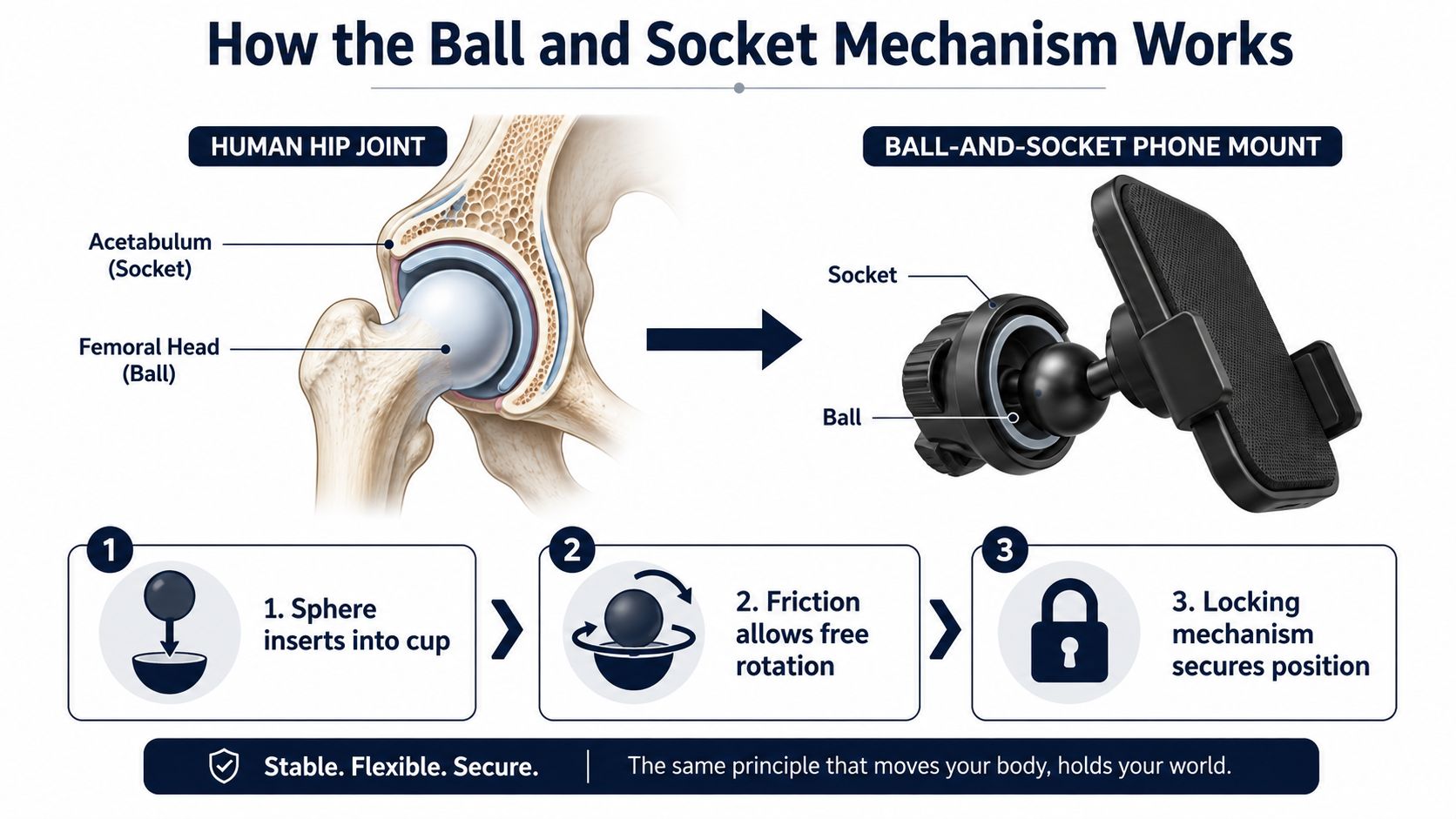
Think of the joint like a human hip. A rounded ball sits inside a cup, allowing movement in several directions until the surrounding structure applies enough pressure to hold the chosen position. A phone mount uses the same basic idea in a smaller mechanical package.
<a id="the-three-working-parts"></a>
The three working parts
The ball connects to the base, arm, or device head. Common systems use standardized spherical sizes, including 1-inch and 2.35-inch formats, although the exact diameter determines which arms and sockets are compatible. A larger ball generally gives the designer more contact area and grip, but it may also require a heavier mounting ecosystem.
The socket wraps around part of the sphere. Its job is to create enough contact and friction to resist the phone's weight and the movement of the vehicle. The socket's shape matters as much as the ball itself. If it contacts only a narrow area, the joint may feel tight in your hand but still creep when the car hits road buzz.
The tightening knob or lever increases compression around the ball. Turning it changes the preload at the interface. With the knob loose, you can rotate and tilt the phone. With it tightened, friction resists movement and keeps the cradle in the selected orientation.
<a id="why-adjustment-range-matters"></a>
Why adjustment range matters
A ball joint can provide broad rotation and tilt adjustment from one connection point. That helps when the driver's seat, dashboard, steering wheel, and sunlight change the ideal viewing angle. You can rotate the screen toward the driver, tilt it to reduce glare, or shift it slightly away from a passenger without rebuilding the mount.
The useful distinction is between free movement during setup and unwanted movement during driving. A quality joint should move smoothly before locking, then hold firmly without requiring excessive force. If the knob bottoms out before the ball is secure, or if the joint still turns after tightening, the interface isn't generating reliable preload.
Vibration control is the hard part. Technical guidance for ball mounts emphasizes that instability often originates in the base and interface geometry, not just the spherical pivot. Designs intended for high-vibration environments may combine preload and friction with secondary stabilization, while locking hardware such as nylon-insert nuts helps resist loosening over time. This ball-mount hardware example illustrates why the fastener system matters alongside the ball.
<a id="choosing-the-right-installation-surface-and-base"></a>
Choosing the Right Installation Surface and Base
A mount can have a tight ball joint and still fail if its base peels, releases, flexes, or passes too much vibration into the phone. Start with the surface, then choose the base that can carry the phone, case, and charging accessory without shifting.
<a id="match-the-base-to-the-surface"></a>
Match the base to the surface
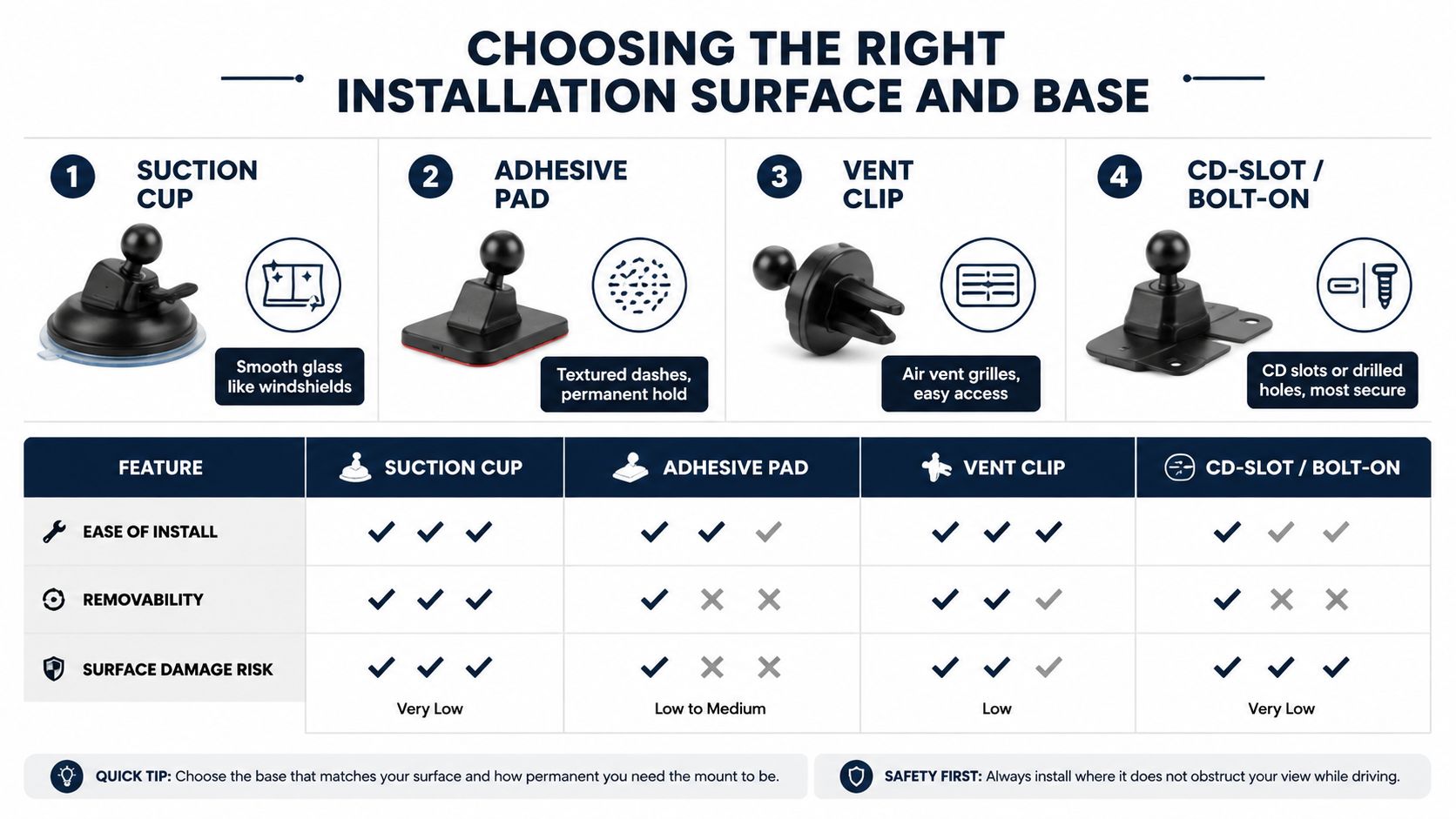
| Base type | Best fit | Main advantage | Main compromise | |---|---|---|---| | Suction cup | Smooth windshield glass | Easy to reposition | Sensitive to contamination and heat | | Adhesive pad | Hard, suitable dashboard areas | Strong, low-profile hold | Removal may leave residue or damage | | Vent clip | Firm air-vent grilles | Fast installation | Adds weight to the vent and can affect airflow | | CD-slot or bolt-on | Existing slots or threaded points | Strong mechanical foundation | Vehicle-specific and less portable |
Suction cups belong on smooth, non-porous glass. Clean the cup and windshield, press evenly, and inspect the seal before adding a heavy phone or wireless-charging cradle. They suit drivers who change vehicles or mounting positions, but dust, summer heat, and repeated temperature changes can weaken the seal.
Adhesive bases need a hard dashboard area that does not flex under load. Clean it with isopropyl alcohol and let it dry fully before applying the pad. Textured, soft, oily, or heavily coated trim gives the adhesive a poor foundation. On a compatible surface, the hold can be very strong and low-profile. Frequent repositioning is a poor match because removal may leave residue or damage the trim.
Vent clips install quickly and keep the screen near the cabin's center. Their limitation is the grille itself. A louver was not designed to carry every large phone, case, and charger combination, while hot or cold airflow can affect the device. Use this base only when the grille feels rigid and the clip does not bend or twist the slats.
CD-slot and bolt-on mounts attach to an existing opening or threaded point. They can provide the firmest foundation when the vehicle supports them, although a CD slot may block nearby controls and a bolt-on setup is harder to reverse. For more detail on placement and dashboard options, see this dash phone mount guide.
<a id="keep-force-at-the-base-under-control"></a>
Keep force at the base under control
A long arm raises the phone but also multiplies force at the base. With a large phone, a thick case, or rough roads, a shorter arm and lower mounting point usually reduce ball-joint creep and produce a steadier image. Keep the base clear of the driver's sight line, instrument display, airbags, and important controls. A stable mount placed too low can still be a poor setup if it makes the driver glance down for longer.
Allow an adhesive pad to settle according to the manufacturer's directions before loading it. Test the mount with a light hand pull, then check the ball and base after a short drive over uneven pavement. If the base shifts under gentle pressure, braking and pothole impacts will move it further. That movement can force repeated adjustments, and a phone that gradually droops may end up requiring more attention than the original hands-free setup intended.
<a id="real-world-use-cases-from-daily-commutes-to-desk-setups"></a>
Real World Use Cases from Daily Commutes to Desk Setups
A ball mount earns its keep when one device moves between environments. The same adjustment range that helps with windshield glare can also improve a bicycle's viewing angle or place a webcam at a better height. The mounting base and phone interface still need to match the environment, though.
<a id="in-car-navigation"></a>
In-car navigation
For commuting, the main benefit is fast angle control. A driver can rotate the screen away from reflected sunlight, tilt it toward the seat, and keep the arm clear of controls. A sturdy socket also makes it easier to set the screen once rather than repeatedly nudging a hinged cradle.
Road trips expose weak joints quickly. Heavy phones and long arms amplify vibration, so a compact arm with a firm ball interface is preferable to a tall, flexible stack. A suction base may be practical for temporary use, while an adhesive or mechanically attached base makes more sense for a vehicle that sees daily mileage.
<a id="bicycle-and-motorcycle-mounting"></a>
Bicycle and motorcycle mounting
On a bicycle, a ball joint lets the rider change the display angle without replacing the handlebar hardware. That can help with glare and provide a more readable position, but the mount must account for road vibration and the consequences of a release. A mechanical retention feature or secondary safety tether is more reassuring than a light spring cradle on uneven routes.
Motorcycles introduce another concern, camera vibration. A mount that feels secure can still transmit sharp vibration into the phone. Riders on rough surfaces should consider a system designed for vibration management rather than choosing solely by how quickly the phone snaps into place.
Ultra-light cycling setups are different. A minimal aerodynamic clamp may be better when every gram and every exposed part matters. The ball mount's adjustability is valuable, but that flexibility can be unnecessary for a rider who wants the phone fixed in one low-profile position.
<a id="desk-and-workstation-use"></a>
Desk and workstation use
At a desk, the joint is useful for video calls, reference material, and content viewing. A quick tilt can improve webcam framing or move the phone away from keyboard glare. Desk use also exposes whether the tightening mechanism is easy to operate, since a mount that requires excessive force becomes tedious during frequent repositioning.
The same phone can support a route, a restaurant search, or a nearby offer while traveling. A map-first experience such as finding restaurant deals near me makes the mount most useful when the driver sets the destination before moving, rather than treating the screen as something to browse continuously.
<a id="the-distraction-debate-and-safer-mount-placement"></a>
The Distraction Debate and Safer Mount Placement
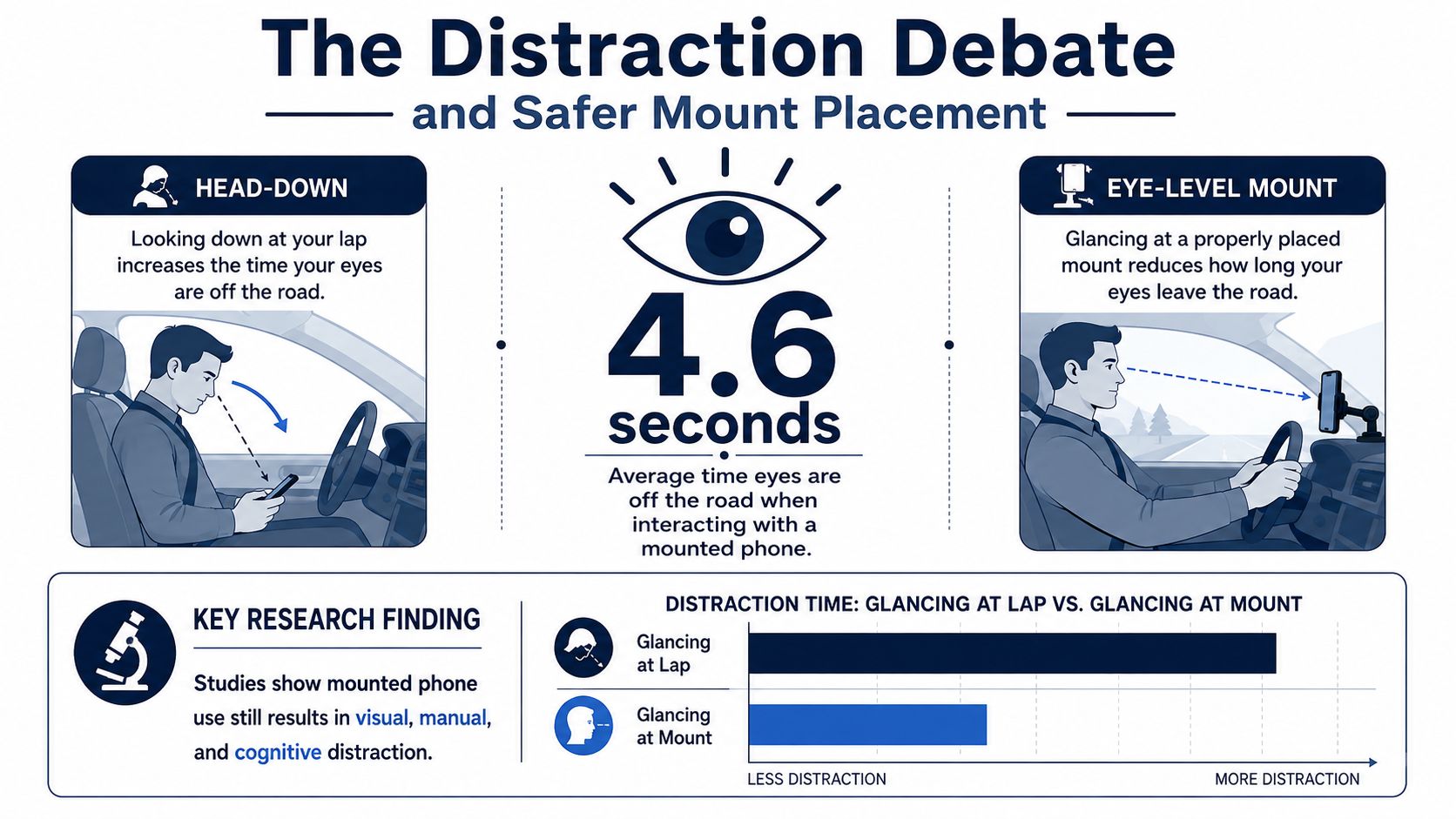
A phone ball mount can keep your hands on the wheel while still increasing glance time. Once the screen sits in clear view, route changes, notifications, and incoming messages become easier to notice. That convenience helps only when the placement supports brief checks rather than casual browsing. A 2022 study on mounted mobile phone distraction found that mounting may create less distraction potential than handheld use, but poor positioning or use can make it comparable to other distracting in-car tasks.
<a id="placement-changes-the-interaction"></a>
Placement changes the interaction
A low mount near the center console can pull the driver's eyes downward for a longer glance. A high windshield mount keeps the screen closer to the forward view, but it may obstruct part of the road scene or compete with changing map content. The best position keeps directions readable, preserves sight lines, and makes browsing inconvenient.
Test the angle from the driver's seat while parked. Check whether the ball joint creeps under vibration, because a slowly dropping phone can force repeated adjustments and longer glances. Heavy phones and wireless charging hardware increase the load on the joint, so a position that works empty may become distracting once the complete setup is installed.
Safer use comes from reducing decisions and taps:
- Use route-first screens: Start navigation before pulling away, then leave the route visible instead of browsing listings.
- Increase readability: Larger map labels and clear controls reduce the need to lean forward or inspect small interface elements.
- Silence interruptions: Limit or disable notifications while driving, especially when the phone remains within easy view.
- Set the angle once: Adjust for glare and peripheral visibility while parked, never at the next red light.
U.S. crash surveillance shows why hands-free compliance is only part of the issue. In 2024, distraction-affected crashes represented 8% of fatal crashes, 13% of injury crashes, and 12% of all police-reported crashes, with 3,208 people killed and 315,167 injured. Phone-related activity was directly implicated in 404 fatal crashes and 437 deaths that year. The figures appear in the study's discussion of U.S. crash safety data.
A mount should reduce handling, not invite more screen time.
Prepare destinations and nearby deals while parked, then use the shortest interaction flow once moving. The mount helps when it supports that routine, not when it turns the dashboard into a second browsing screen.
<a id="compatibility-challenges-with-modern-phones-and-accessories"></a>
Compatibility Challenges with Modern Phones and Accessories
The phone in your hand today may be much heavier than the one your first mount was designed around. Large screens, foldable formats, rugged cases, camera bumps, magnetic rings, and wireless charging accessories all change the load path between the device and the ball joint.
<a id="start-with-the-complete-phone-package"></a>
Start with the complete phone package
Measure the phone with its case installed, not as a bare handset. Check the cradle's minimum and maximum width, arm depth, contact-pad position, and clearance around the camera bump. A case that feels slim in the shop can become a serious source of instability once a charging plate or magnetic adapter sits between the phone and mount.
Foldables and heavy protective cases deserve special attention. Their added mass increases the force acting on the ball interface, especially when the phone sits on a long arm. If the joint holds a bare phone but creeps with the actual setup, the mount isn't compatible with your use case.
<a id="wireless-charging-and-magnetic-attachment"></a>
Wireless charging and magnetic attachment
Wireless charging adds another layer of alignment. A cradle may hold the phone securely while placing the charging coil too far from the pad, or the mounting hardware may add thickness that prevents reliable contact. Magnetic attachment can simplify insertion, but a magnetic ring, case, charger, and cradle must be compatible as a system rather than judged separately.
Look for a mount that leaves the charging area clear and allows the cable to exit without bending sharply. If you use a magnetic system, check whether the magnet controls the phone's position or merely attracts it. On rough roads, a mechanical retention feature can provide useful backup.
Market research identifies support for larger devices, stronger secure designs, and wireless charging as important category trends. Forecasts vary, with one market report estimating the broader phone car mounts market at US$4.11 billion in 2025 and US$7.52 billion by 2034, while another industry analysis discusses projected growth estimates in the approximate 4.8% to 6.1% range through later forecast periods. These are projections, not guarantees, and the phone mount market analysis from Global Market Insights illustrates why compatibility has become a central buying criterion.
<a id="inspect-the-joint-not-just-the-cradle"></a>
Inspect the joint, not just the cradle
Choose wider cradle arms for large phones, a stronger preload mechanism for heavy combinations, and hardware that resists loosening in vibration. Nylon-insert nuts and comparable locking hardware can help prevent fasteners from backing out over time, but they won't compensate for an overloaded or poorly supported base.
Before buying, ask four questions:
- Will the cradle fit the phone and case together?
- Does the charging setup add thickness or interfere with contact?
- Can the ball joint hold the complete device package without creeping?
- Does the base suit the road, surface, and vehicle where it will live?
<a id="quick-setup-tips-and-pre-drive-checklist"></a>
Quick Setup Tips and Pre Drive Checklist
Install the mount in this order:
- Clean and dry the chosen surface.
- Attach the suction, adhesive, vent, CD-slot, or bolt-on base.
- Connect the ball arm and tighten the base connection.
- Attach the phone cradle or magnetic head.
- Place the phone, set the angle, and reduce glare.
- Tighten the ball joint firmly, then check the cable path.
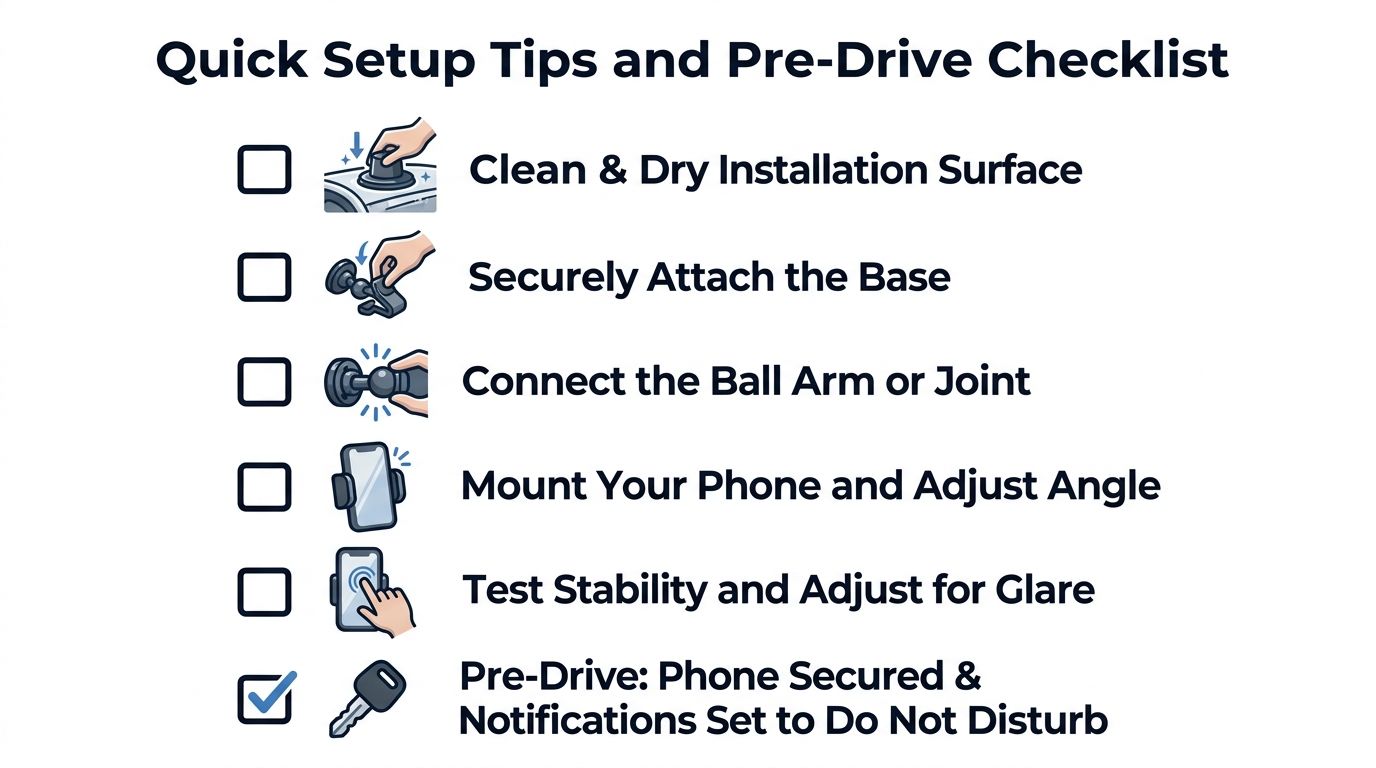
Before driving, confirm the base is secure, give the phone a gentle tug, and make sure the ball joint doesn't rotate. Check that the screen doesn't block the road, mirrors, gauges, or controls, and leave enough cable slack for steering and normal phone movement. Set navigation and notification preferences while parked.
<iframe width="100%" style="aspect-ratio: 16 / 9;" src="https://www.youtube.com/embed/gqxcUTAEtk8" frameborder="0" allow="autoplay; encrypted-media" allowfullscreen></iframe>A dependable mount is the one you stop thinking about after setup. If your daily drives also involve finding timely local offers without unnecessary browsing, visit AIR.POG to explore nearby deals on a map and use its quick route-focused flow. Set up the destination before moving, keep interactions minimal, and let the phone ball mount do its job without becoming another distraction.
Spread the word — every share brings more POG'rs to the map. 🎯
Got a story or tip?
